Manage participants in card sort studies
Adding participants to a card sort study
Participants stored in the UserBit Participants CRM can be added directly to a Card Sort study. This helps you reuse existing contacts and keep participant management consistent across studies.
You can add Participants while setting up or managing a Card Sort study. In the Participants section, you can create individual session links for each participant. These links are unique and tied to a specific person, which helps you track responses accurately.
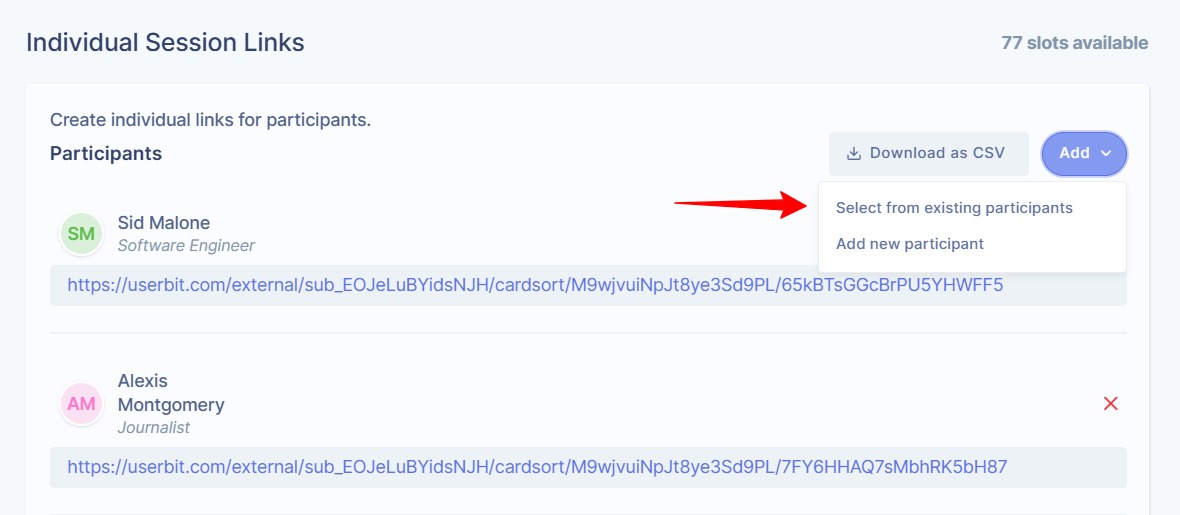
To add a participant, click on the Add button. You can select contacts from your CRM by clicking on select from existing participants or create a new entry directly from here by clicking on Add new participant. Once added, UserBit automatically generates a unique study link for that participant.
Each participant gets their own session URL. You can copy and share this link manually via email, WhatsApp, or any other channel you prefer. This gives you full control over how invitations are sent.
If needed, you can remove a participant by clicking the delete (X) icon next to their name. You can also download the participant list as a CSV file for your records.
This setup makes it easy to manage invitations, track participation, and keep every session organized without confusion.